Introducing Stedi's new benefits table for eligibility checks
Products
We’ve redesigned the benefits table for eligibility responses in the Stedi portal to make it faster and easier to read a patient’s benefits.
Benefits are now grouped by health plan. Each plan begins with its general limitations, followed by benefit details. The benefit details are organized by the Service Type Codes (STCs) and procedure codes from the payer’s response.
If present, benefits for STC 30 (Health Benefit Plan Coverage) and STC 35 (Dental Care) – the baseline STCs for medical and dental care – appear first.
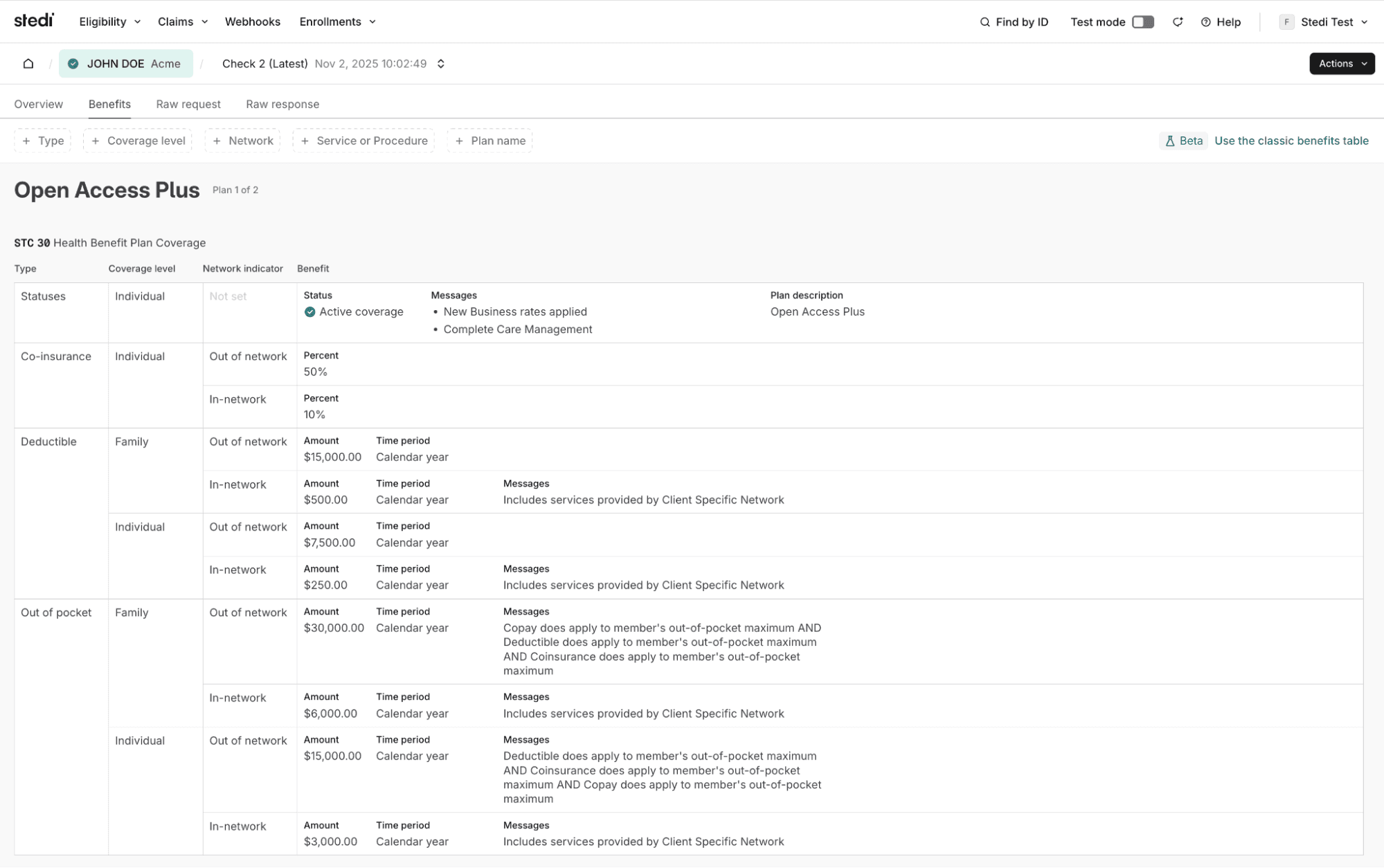
The table displays information from the benefitsInformation objects in Stedi’s JSON Eligibility API responses.
Filter benefits
You can filter the table to quickly find benefits for a specific service, procedure, or coverage type – like a deductible or limitation. You can also filter by coverage level and whether the benefit applies to in-network or out-of-network services.
For example, you can filter the table to only show individual deductibles for STC 3 (Consultation).

How to access the benefits table
Sign in to your Stedi account and go to Eligibility Searches. Run a new eligibility search or select an existing one. Then click Benefits.
Share
Start free with a sandbox account. Upgrade to production when you're ready. There are no monthly minimums or setup fees. You only pay for the transactions you use. See our pricing.
