Introducing operating states for payers
Payers
You can now see which U.S. states and territories a payer operates in using the Stedi Payer Network website and the Payers API.
Stedi payer records now list the states or territories where the payer is known or expected to offer coverage, based on Stedi’s curated sources. If Stedi doesn’t know the payer’s operating states, they aren’t included in the record.
You can also filter by operating states when searching for payers.
Filter by operating state in the Stedi Payer Network
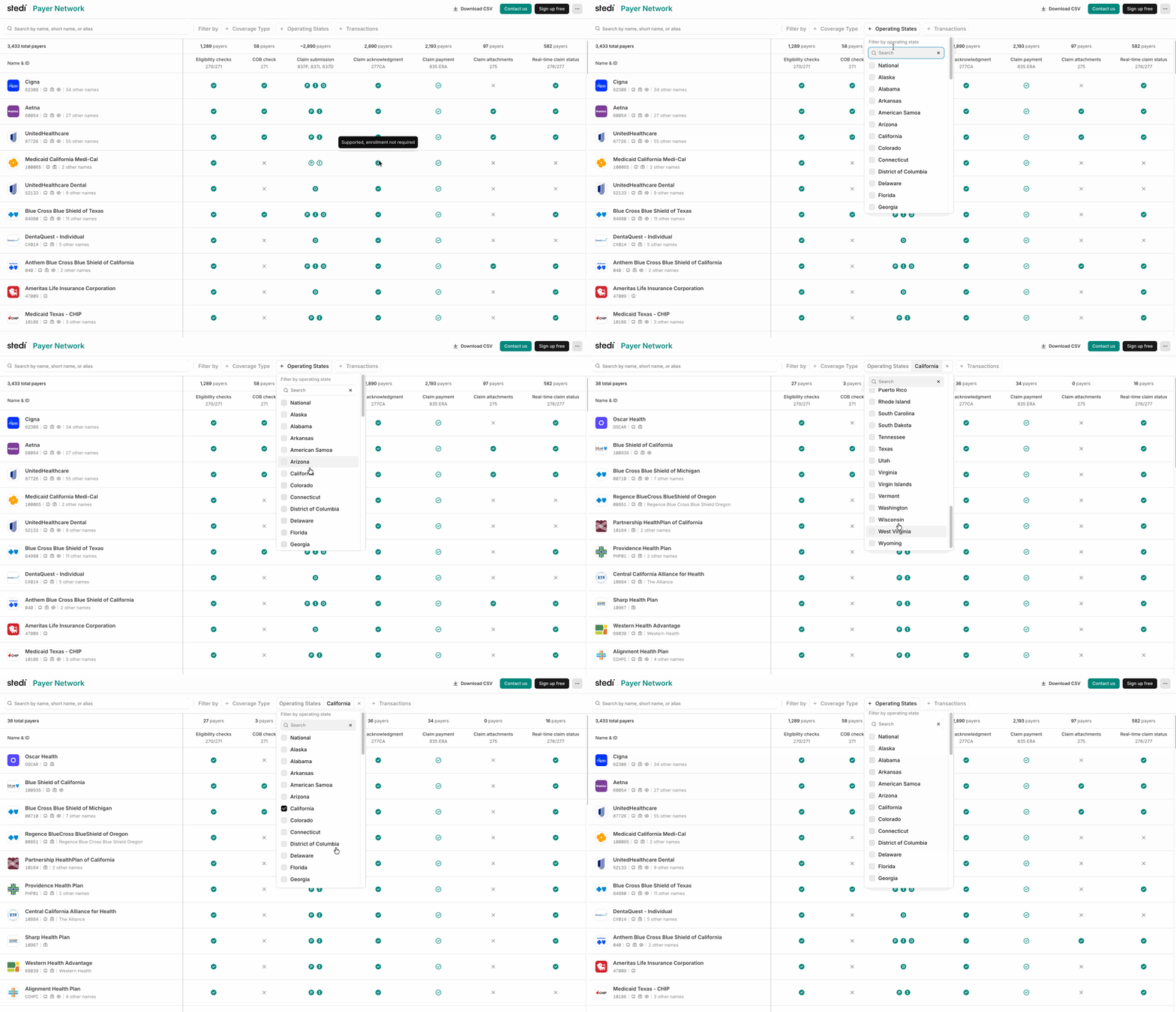
When you browse or search payers on the Payer Network, click + Operating States beside Filter by and select one or more states. The results will use AND logic to only show payers that operate in those states.
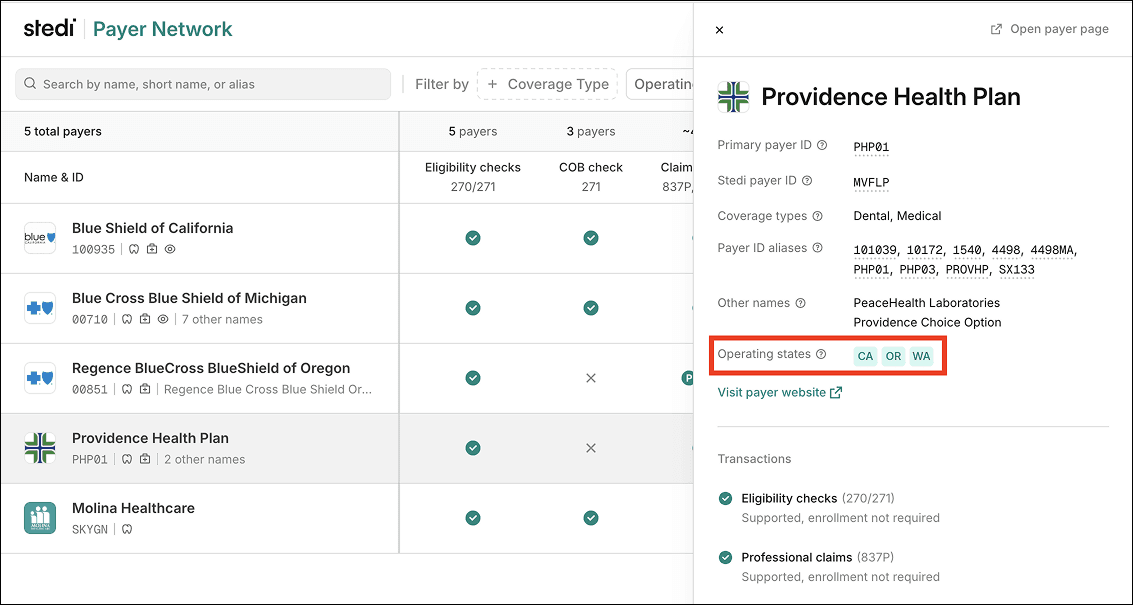
Each payer now lists its Operating States in the Payer pane. National payers – those who cover all U.S. states display NATIONAL. Regional payers list one or more U.S. state or territory codes, such as CA (California) or WA (Washington).
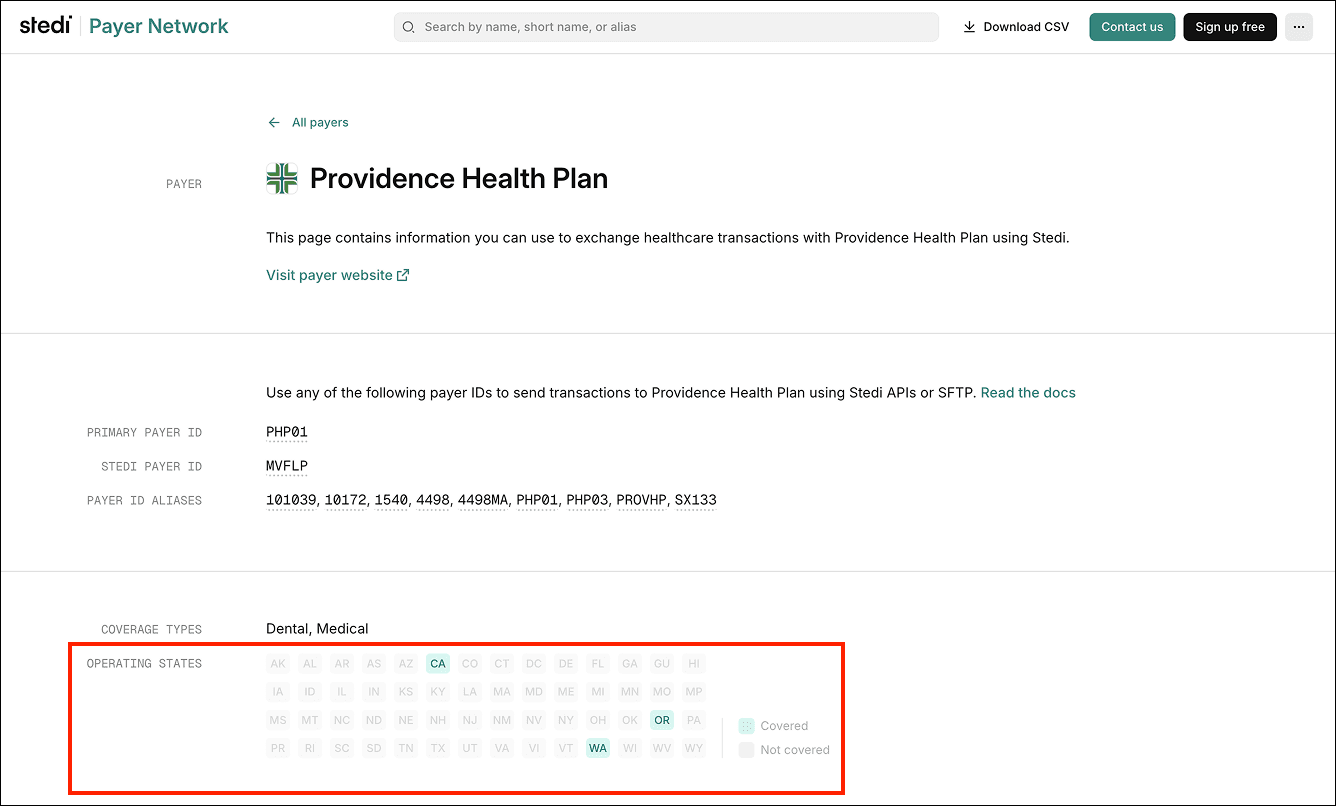
Operating states are also listed on the Payer page:
Operating states in the Payers API
All Payers API endpoints also now return an operatingStates array, if available, for payer records:
{
  "displayName": "Providence Health Plan",
  "primaryPayerId": "PHP01",
  "operatingStates": [
    "CA",
    "OR",
    "WA"
  ],
  ...
},
{
  "displayName": "Providence Health Plan",
  "primaryPayerId": "PHP01",
  "operatingStates": [
    "CA",
    "OR",
    "WA"
  ],
  ...
},
{
  "displayName": "Providence Health Plan",
  "primaryPayerId": "PHP01",
  "operatingStates": [
    "CA",
    "OR",
    "WA"
  ],
  ...
},
Payers that cover all U.S. states contain a single NATIONAL value in the array:
{
  "displayName": "Cigna",
  "primaryPayerId": "62308",
  "operatingStates": [
    "NATIONAL"
  ],
  ...
}
{
  "displayName": "Cigna",
  "primaryPayerId": "62308",
  "operatingStates": [
    "NATIONAL"
  ],
  ...
}
{
  "displayName": "Cigna",
  "primaryPayerId": "62308",
  "operatingStates": [
    "NATIONAL"
  ],
  ...
}
Filter by operating state using the Payers API
You can also filter payers by operating state using the Search Payers endpoint’s new operatingStates query parameter.
The parameter expects exact matches and can accept multiple values. The endpoint uses AND logic to return the intersection of all filters.
For example, the following query returns only payers that operate in both CA (California) and WA (Washington):
curl --request GET \
  --url "https://healthcare.us.stedi.com/2024-04-01/payers?operatingStates=CA&operatingStates=WA" \
  --header "Authorization: <api_key>"
curl --request GET \
  --url "https://healthcare.us.stedi.com/2024-04-01/payers?operatingStates=CA&operatingStates=WA" \
  --header "Authorization: <api_key>"
curl --request GET \
  --url "https://healthcare.us.stedi.com/2024-04-01/payers?operatingStates=CA&operatingStates=WA" \
  --header "Authorization: <api_key>"
You can now see which U.S. states and territories a payer operates in using the Stedi Payer Network website and the Payers API.
Stedi payer records now list the states or territories where the payer is known or expected to offer coverage, based on Stedi’s curated sources. If Stedi doesn’t know the payer’s operating states, they aren’t included in the record.
You can also filter by operating states when searching for payers.
Filter by operating state in the Stedi Payer Network
When you browse or search payers on the Payer Network, click + Operating States beside Filter by and select one or more states. The results will use AND logic to only show payers that operate in those states.
Each payer now lists its Operating States in the Payer pane. National payers – those who cover all U.S. states display NATIONAL. Regional payers list one or more U.S. state or territory codes, such as CA (California) or WA (Washington).
Operating states are also listed on the Payer page:
Operating states in the Payers API
All Payers API endpoints also now return an operatingStates array, if available, for payer records:
{
  "displayName": "Providence Health Plan",
  "primaryPayerId": "PHP01",
  "operatingStates": [
    "CA",
    "OR",
    "WA"
  ],
  ...
},
Payers that cover all U.S. states contain a single NATIONAL value in the array:
{
  "displayName": "Cigna",
  "primaryPayerId": "62308",
  "operatingStates": [
    "NATIONAL"
  ],
  ...
}
Filter by operating state using the Payers API
You can also filter payers by operating state using the Search Payers endpoint’s new operatingStates query parameter.
The parameter expects exact matches and can accept multiple values. The endpoint uses AND logic to return the intersection of all filters.
For example, the following query returns only payers that operate in both CA (California) and WA (Washington):
curl --request GET \
  --url "https://healthcare.us.stedi.com/2024-04-01/payers?operatingStates=CA&operatingStates=WA" \
  --header "Authorization: <api_key>"
Get started with Stedi
Get started with Stedi
Start free with a sandbox account. Upgrade to production when you're ready. There are no monthly minimums or setup fees. You only pay for the transactions you use. See our pricing.
Get updates on what’s new at Stedi
Get updates on what’s new at Stedi
Get updates on what’s new at Stedi
Product
Developers
Resources
Get updates on what’s new at Stedi

Backed by
Stedi and the S design mark are registered trademarks of Stedi, Inc. All names, logos, and brands of third parties listed on our site are trademarks of their respective owners (including “X12”, which is a trademark of X12 Incorporated). Stedi, Inc. and its products and services are not endorsed by, sponsored by, or affiliated with these third parties. Our use of these names, logos, and brands is for identification purposes only, and does not imply any such endorsement, sponsorship, or affiliation.
Product
Developers
Resources
Get updates on what’s new at Stedi
Backed by
Stedi and the S design mark are registered trademarks of Stedi, Inc. All names, logos, and brands of third parties listed on our site are trademarks of their respective owners (including “X12”, which is a trademark of X12 Incorporated). Stedi, Inc. and its products and services are not endorsed by, sponsored by, or affiliated with these third parties. Our use of these names, logos, and brands is for identification purposes only, and does not imply any such endorsement, sponsorship, or affiliation.
Product
Developers
Resources
Get updates on what’s new at Stedi
Backed by
Stedi and the S design mark are registered trademarks of Stedi, Inc. All names, logos, and brands of third parties listed on our site are trademarks of their respective owners (including “X12”, which is a trademark of X12 Incorporated). Stedi, Inc. and its products and services are not endorsed by, sponsored by, or affiliated with these third parties. Our use of these names, logos, and brands is for identification purposes only, and does not imply any such endorsement, sponsorship, or affiliation.